Documents
 Join our Discord
Description:
Add more realism, interaction, and roleplay depth to your server with Tweekz Advanced Weapon System.
This script expands weapon handling by allowing players to throw or drop weapons, pick them back up, lose weapons on death, inspect dropped weapons as evidence, and display weapons on the body.
It is perfect for servers that want more immersive weapon interactions, police evidence roleplay, and a cleaner visual weapon system.
Core Features:
Weapon Throwing System: Players can throw or drop the weapon they are currently holding.
Ground Weapon Drops: Dropped weapons appear on the ground and can be picked up again.
Target & E-Key Pickup: Players can pick up weapons using ox_target/qb-target or by pressing E.
Death Drop System: When a player dies, configured weapons can be removed from their inventory and dropped on the ground.
Drop All Inventory Weapons: Option to drop all weapon items from a player’s inventory on death.
Anti-Dupe Protection: Weapons are removed from the inventory before being created as ground drops.
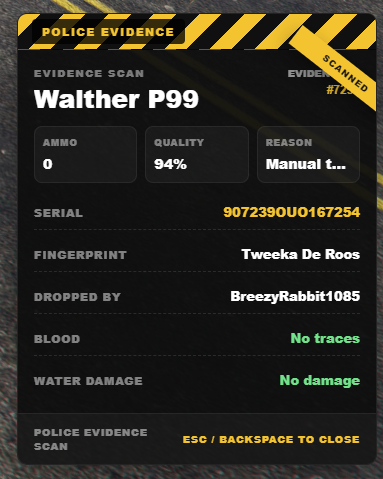
Evidence System: Dropped weapons can store serial numbers, fingerprints, ammo, quality, drop reason, blood traces, and water damage.
Police Evidence Collection: Police can collect dropped weapons as evidence using /collectevidence.
Weapon Inspection UI: Includes a custom HTML evidence tag menu for inspecting dropped weapons.
Back Weapons: Large weapons can be shown on the player’s back.
Side Weapons: Small weapons such as pistols can be shown on the player’s side/hip.
Backpack Mode: Option to show a backpack/tas instead of visible back weapons for a cleaner look.
Disarm on Taser: Configurable chance for players to drop their weapon when tasered.
Disarm on Ragdoll/Fall: Configurable chance for players to drop their weapon when falling or ragdolling.
Water Damage: Weapons dropped in water can receive damage metadata or be deleted.
Anti-Combat Abuse: Prevents players from throwing weapons immediately after shooting.
Weapon Blacklist: Block specific weapons such as RPGs, explosives, throwables, or utility items from being manually thrown.
Custom Weapon Support: Easily add custom weapons, labels, classes, models, throw profiles, and visual positions.
Admin Clear Command: Admins can clear active weapon drops from the server.
Toggle Visible Weapons: Players can toggle visible back/side weapons for themselves.
QBCore / Qbox Support: Built with QBCore and Qbox/QBX support in mind.
Target System Support: Supports ox_target and qb-target.
Inventory System Support: Supports common QBCore/Qbox inventory setups, including ox_inventory and qb-inventory.
Fully Configurable: Weapon rules, evidence, death drops, visuals, backpack mode, police settings, blocked zones, and more can be adjusted in the config.
Configuration:
The script is highly customizable to fit your server’s needs. You can easily modify the following in the config files:
Weapon Throwing: Adjust throw force, blocked weapons, cooldowns, restrictions, and throw behavior.
Death Drops: Configure if weapons drop on death, if all inventory weapons should drop, and if blacklisted weapons drop on death.
Evidence System: Configure fingerprints, serials, ammo, quality, blood traces, water damage, and police-only inspection.
Evidence UI: Choose between NUI, draw, chat, or ox fallback modes.
Back Weapons: Configure which large weapons appear on the player’s back.
Side Weapons: Configure which small weapons appear on the player’s side/hip.
Backpack Mode: Choose between visible weapons, backpack-only mode, or both.
Custom Weapons: Add custom weapon item names, labels, classes, models, and positions.
Blacklist System: Decide which weapons cannot be manually thrown.
Disarm Features: Configure taser, ragdoll, and fall disarm chances.
Water Damage: Enable water damage, quality loss, or delete weapons dropped in water.
Anti-Combat Abuse: Block weapon throwing shortly after shooting.
Police Settings: Configure police jobs, evidence collection, and inspect permissions.
Blocked Zones: Prevent weapon throwing in places like police stations, hospitals, safezones, or spawn areas.
Admin Tools: Configure admin commands and permissions.
Information:
Discord: discord.gg/tweekzscripts
Documentation: tweekzscripts.gitbook.io/documents
Store: tweekzscripts-store.tebex.io